Building an Autonomous Agent to Play Text Adventures (LLM + MCP) 🕹️🤖
- Overview
- What is a text adventure? 🗺️
- The game engine: Jericho 🎲
- Architecture: a clean separation of “tools” and “brain” 🏗️
- The agent in action 🎮
- The platform: Huggingface as the LLM provider ☁️
- Extra things I built (that made this fun) ✨
- More to explore 🚀
- References 🔗
Overview
As a kid, I spent hours playing games like Sam & Max Hit the Road and Monkey Island. They aren’t strictly text adventures, but the core loop is the same: explore, read clues, try actions, get stuck, backtrack, and slowly progress in this parallel universe.
This project was my attempt to automate that loop: an autonomous agent that plays classic text adventure games end-to-end — no human typing — just a language model choosing actions through a tool interface.
It was part of the 2026 LLM Course taught by Nathanaël Fijalkow and Marc Lelarge. Thank you for this fun project!
What is a text adventure? 🗺️
A text adventure is a game with no graphics. The entire world is described in words, and you interact with it by typing plain English commands: go north, take lamp, open door, read note. The game replies with a paragraph describing what happened and what you can see, hear, or smell. That’s it — no images, no mouse, no UI. Just a conversation between you and the game engine.
Zork is one of the most iconic examples. Released in 1980 by Infocom, it drops you outside a white house with a mailbox and an underground dungeon to explore. The goal is to collect treasures without being eaten by a grue (a creature that lurks in the dark and kills you instantly if your lamp runs out).
What makes it hard — and interesting as an agent benchmark — is that the game never tells you the rules directly. You have to infer them. A room description mentioning “low branches” is a hint to climb tree. A dark passage means you need a light source before entering. There’s no tutorial, no health bar.
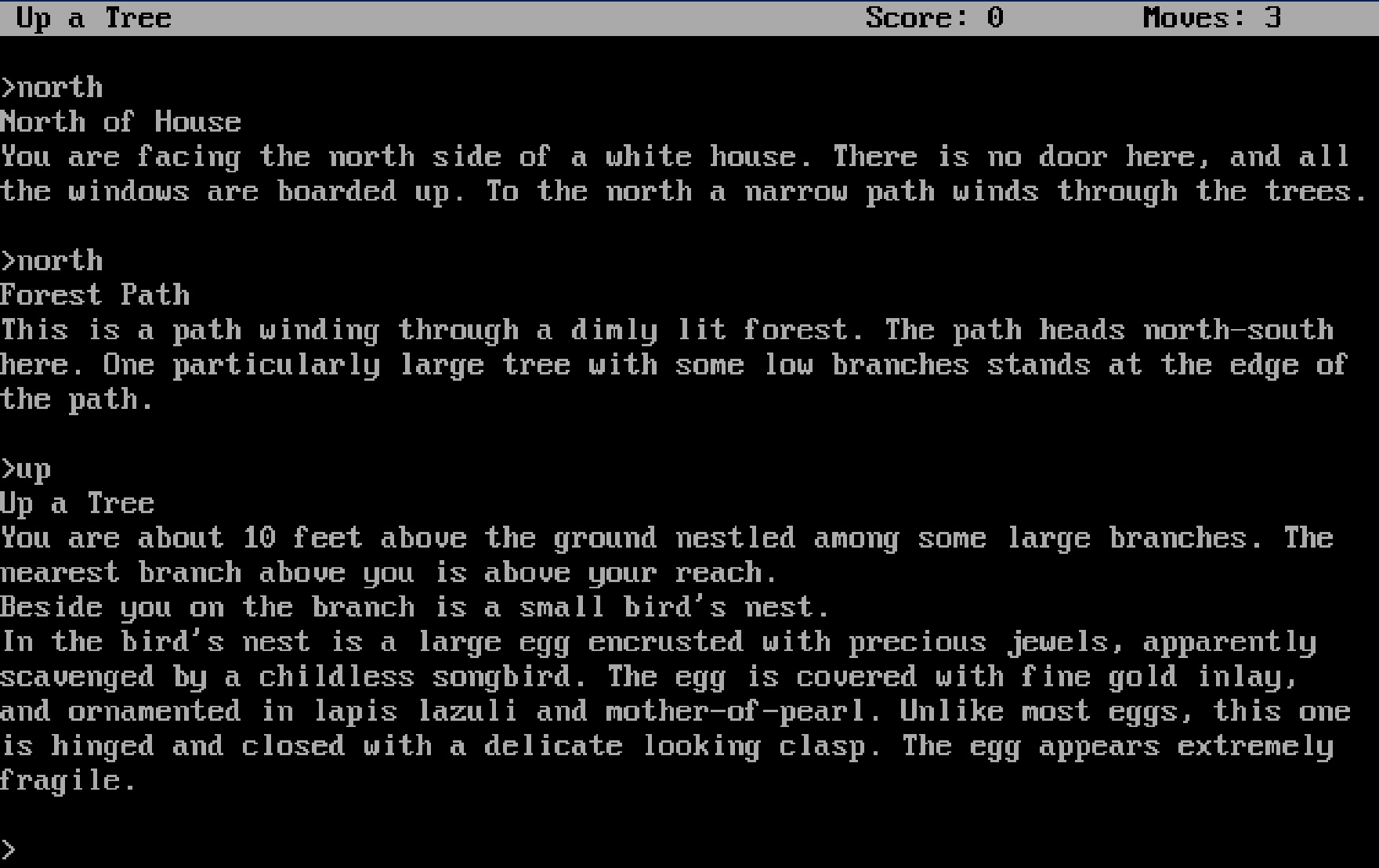
The screenshot below is from a live session — I’ve already made three moves (north, north, up).
After each command, the game responds with a description of your new surroundings, any objects present, and sometimes a subtle hint about what to do next:
This is a path winding through a dimly lit forest. The path heads north-south here. One particularly large tree with some low branches stands at the edge of the path.
That last detail — “large tree with some low branches” — is the game hinting you toward climb tree. This will be the LLM task to understand what the game is telling us.
What you really want to avoid:
*Oh, no! A lurking grue slithered into the room and devoured you! ** You have died ** *
The game engine: Jericho 🎲
Jericho is a Python library developed at Microsoft Research that lets you programmatically interact with classic Z-machine text adventure games — the same format used by Zork, Hitchhiker’s Guide to the Galaxy, and hundreds of other Infocom titles.
Under the hood it wraps Frotz, a Z-machine emulator, but exposes a clean Python API:
>>> import jericho
...
... env = jericho.FrotzEnv("z-machine-games-master/jericho-game-suite/zork1.z5")
...
... obs, info = env.reset()          # start a new game
... obs, score, done, info = env.step("open mailbox")  # send a command
...
>>> obs
'Opening the small mailbox reveals a leaflet.\n\n'
>>> env.step("south")
('South of House\nYou are facing the south side of a white house. There is no door here, and all the windows are boarded.\n\n', 0, False, {'moves': 2, 'score': 0})
>>> env.step("south")
('Forest\nThis is a dimly lit forest, with large trees all around.\n\n', 0, False, {'moves': 3, 'score': 0})
>>> env.step("inventory")
('You are empty-handed.\n\n', 0, False, {'moves': 4, 'score': 0})
A few things that make Jericho useful for agent research:
- Game state access — you can query the current location ID, score, inventory, and whether the game is over at any step.
- Valid action list — for some games, Jericho can propose some actions.
- Reproducibility — you can save and restore game states, which is great for debugging a specific decision point.
- Large game library — it ships with support for 57 classic games, so the same agent code can be tested on many environments.
The MCP server (see below) wraps Jericho so the agent never calls it directly — it only ever calls tools like play_action and get_map.
Architecture: a clean separation of “tools” and “brain” 🏗️
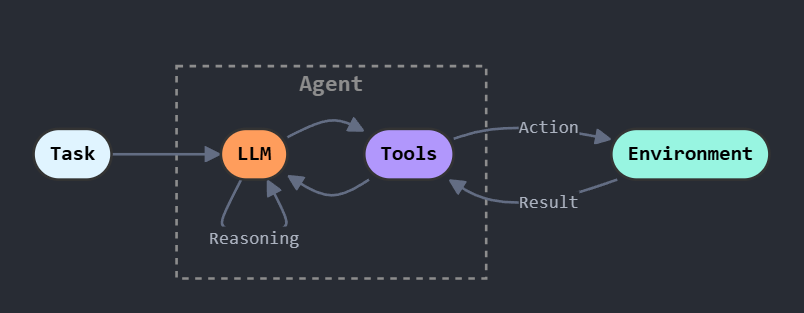
What is a ReAct agent? 🤖🧠
ReAct (Reasoning + Acting) is a prompting pattern introduced in a 2022 paper by Yao et al. The core idea: make the LLM alternate between two kinds of output — thinking and doing — in a tight loop.
Before ReAct, agents either reasoned without grounding (chain-of-thought, no tool use) or acted without reasoning (pure tool calls). ReAct combines both: every action is preceded by an explicit thought, and every tool result feeds back into the next thought. This makes the agent’s behavior easy to read and easy to fix — when something goes wrong, you can follow the thought trace and see exactly where it went off the rails.
The agent uses a strict, parseable format:
THOUGHT: <brief reasoning>
TOOL: <tool_name>
ARGS: <JSON>
This is one of the highest-leverage decisions in the whole project: it keeps tool invocation machine-readable and makes failures easier to diagnose.
The system is split into two major pieces:
- LLM = Agent = decision-making
- Calls the LLM
- Chooses which tool to call next
- Keeps lightweight state (recent actions, stagnation detection, etc.)
- Tools = MCP server = capabilities
- Wraps the game environment (Jericho/Z-machine)
- Exposes tools like
play_action,memory,get_map,inventory
My agent’s strategy: exploration first!
At each step, the agent:
- Observes the latest game output (usually from
play_action). - Reflects using the LLM and short-term state (recent actions, discovered locations, etc.).
- Acts by calling one MCP tool.
- Updates counters and logs.
The agent is explicitly biased toward exploration:
- Try cardinal directions systematically.
- Avoid repeating actions like
lookin loops. - When stuck, consult
get_map(throttled to avoid spamming). - Interact with objects mentioned in the room description.
It also maintains state in the background:
- Tracks unique locations (using an internal location ID).
- Builds a location graph from movement actions.
- Extracts objects in a room — using a small LLM, since the game text is intentionally obscure and ambiguous.
- Emits event logs for post-run analysis.
This doesn’t solve Zork on its own, but it is capable of exploring Zork world and unlocking clues!
Why MCP is a great fit for this 🔧
MCP (Model Context Protocol) is an open standard introduced by Anthropic in 2024. The idea: define a universal way for LLM clients to discover and call tools, so that any client speaking the protocol can connect to any MCP server — regardless of which model or host is on the other end.
The same MCP server I wrote for this project can be plugged into:
- VS Code via the GitHub Copilot agent mode (see below for experiments’ results)
- Claude — Anthropic’s own app has native MCP support
- Cursor, Windsurf, and other editors that have adopted the standard
- Any custom client built with the official SDKs (Python, TypeScript, etc.)
Swap the client, swap the model, the server stays the same.
For this project specifically, MCP is also a strong fit because it forces good boundaries:
- Stable interface: the agent only needs tool names + JSON args, not emulator internals.
- Debuggable runs: you can inspect what the agent asked the server to do vs what actually happened.
- Swap models easily: the tool layer stays constant even if you change LLMs.
- Encourages structured state: tools like
memoryandget_mapprovide anchors that pure text often lacks.
Implementation: the MCP server (tool layer) 🛠️
The MCP server wraps a game environment and adds “agent-friendly” structure.
Tools exposed
A typical minimal toolbox looks like:
play_action(action: str) -> str— send a game command likenorth,open mailbox,take lamp.memory() -> str— summary: current location, number of discovered locations, recent actions, current observation.get_map() -> str— a discovered location graph inferred from movements.inventory() -> str— what the player is carrying.
Debugging with the MCP Inspector
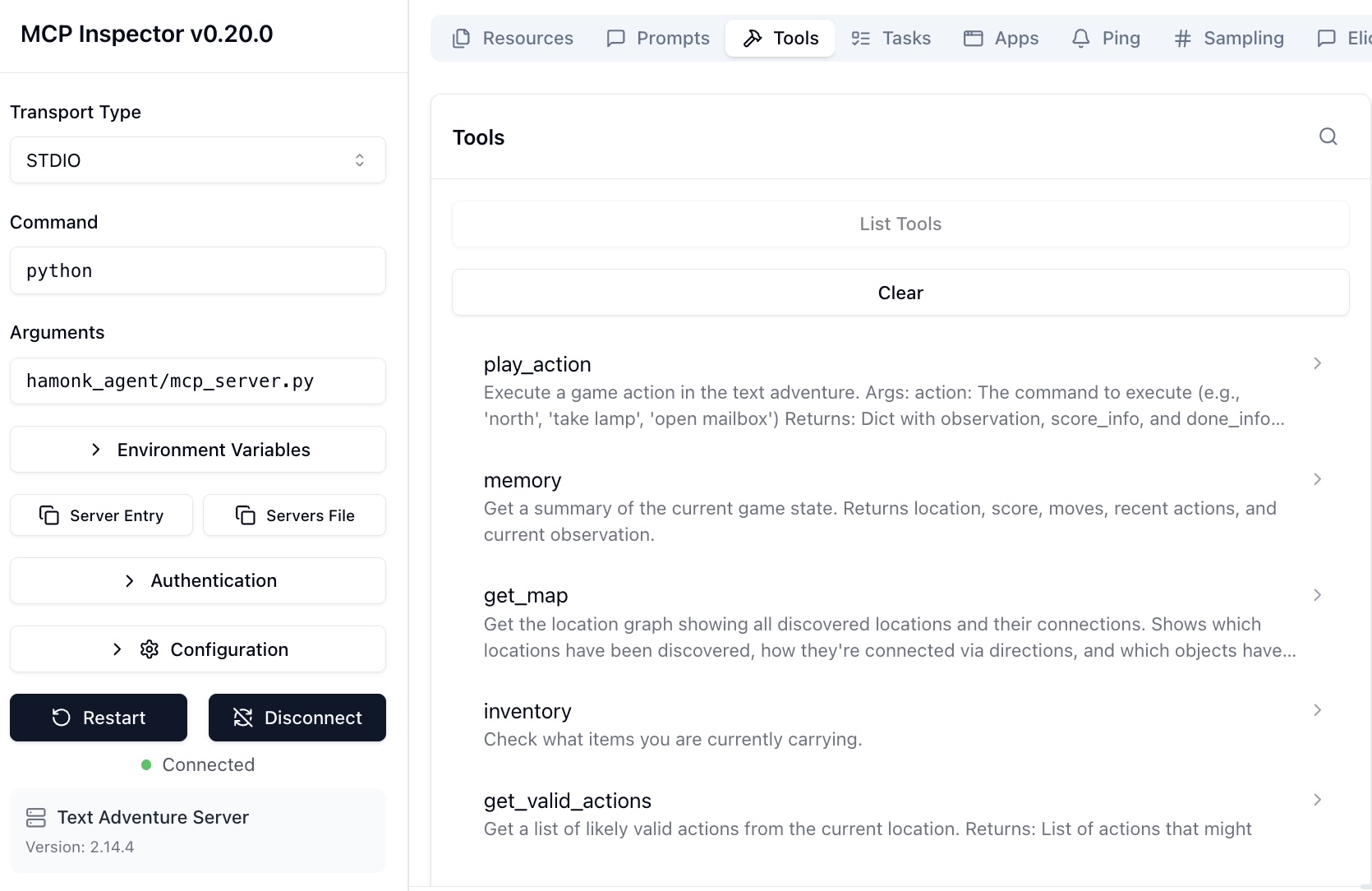
One of the perks of building on MCP is the MCP Inspector — an official browser-based tool that connects to any MCP server and lets you explore and call its tools manually, without writing a single line of client code.
Instead of running the full agent loop to check whether a tool was working, I could just open the inspector, pick a tool, pass some args, and see the raw result immediately. It’s the equivalent of a REST API client like Postman, but for MCP.
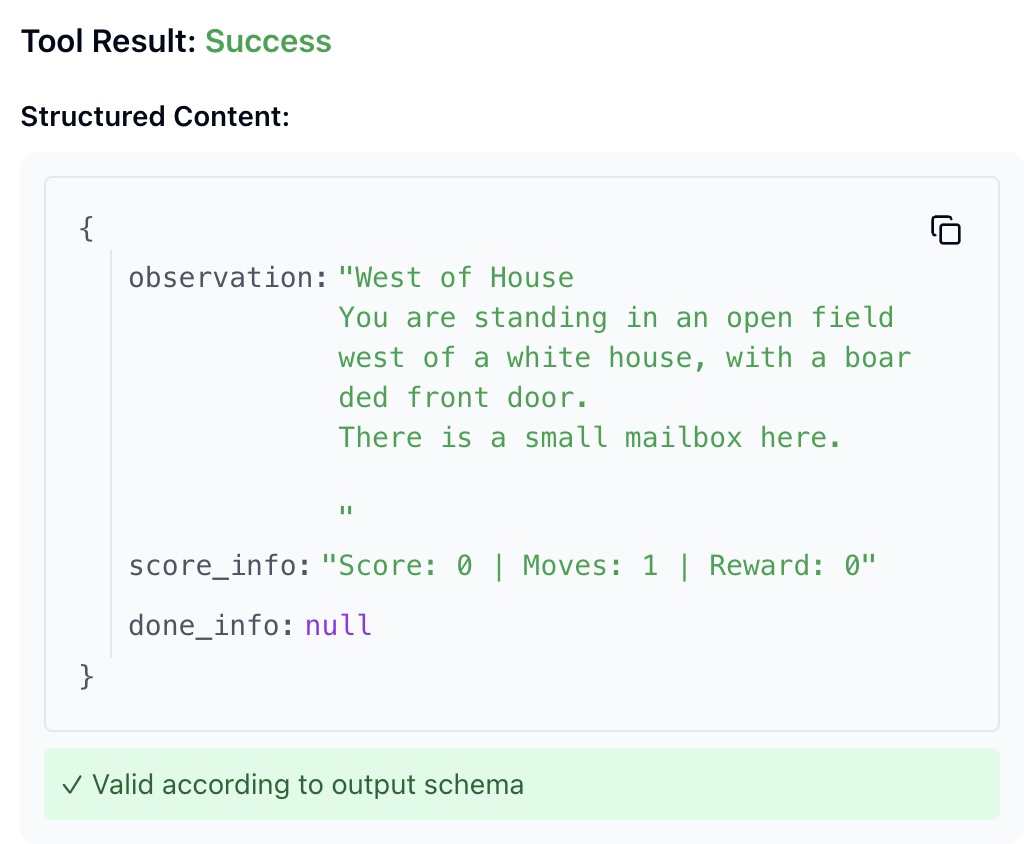
The first screenshot shows the tool list — play_action, memory, get_map, inventory — exactly as the agent sees them. The second shows a live tool call and its response.
The agent in action 🎮
Example gameplay (from a real run) 🎮
This excerpt is adapted from a Zork run — key steps only, not the full transcript.
Step 1 — The agent sees a mailbox in the opening description and acts on it.
- Action:
open mailbox - Result: discovers a leaflet inside.
It takes and reads the leaflet (classic Zork onboarding), then heads north into the forest.
Steps 6–7 — It spots a climbable tree and acts on the hint.
climb tree→ discovers a bird’s nesttake egg→ score increases
Step ~16 — Exploration stalls, so it calls the map tool.
- Tool:
get_map - Result: a location graph with discovered rooms and connections.
That’s the pattern I was aiming for: read the world, act on specific details, call tools when stuck, avoid spinning in circles.
Getting stuck 😵
The game is genuinely difficult. The agent tends to fixate on the objects in a room, exhaust every interaction, and then stall — no clear next move, so it cycles through the same actions again.
A good example is the kitchen. The game output is dense with interactable objects:
You are in the kitchen of the white house. A table seems to have been used
recently for the preparation of food. A passage leads to the west and a dark
staircase can be seen leading upward. A dark chimney leads down and to the
east is a small window which is open.
On the table is an elongated brown sack, smelling of hot peppers.
A bottle is sitting on the table.
The glass bottle contains: A quantity of water.
The correct move here is simply west — but the room description mentions a sack, a bottle, a staircase, a chimney, and a window. Some runs identify the exit immediately and move on. Others get absorbed by the objects, interact with each one in turn, and never leave.
This is the hard part of text adventure agents: knowing when to stop exploring a room and commit to moving forward. It requires understanding that not every object is a puzzle, and that exits matter more than inventory when you’re trying to make progress.
Some results
This chart plots a count of unique rooms discovered over the course of a run:
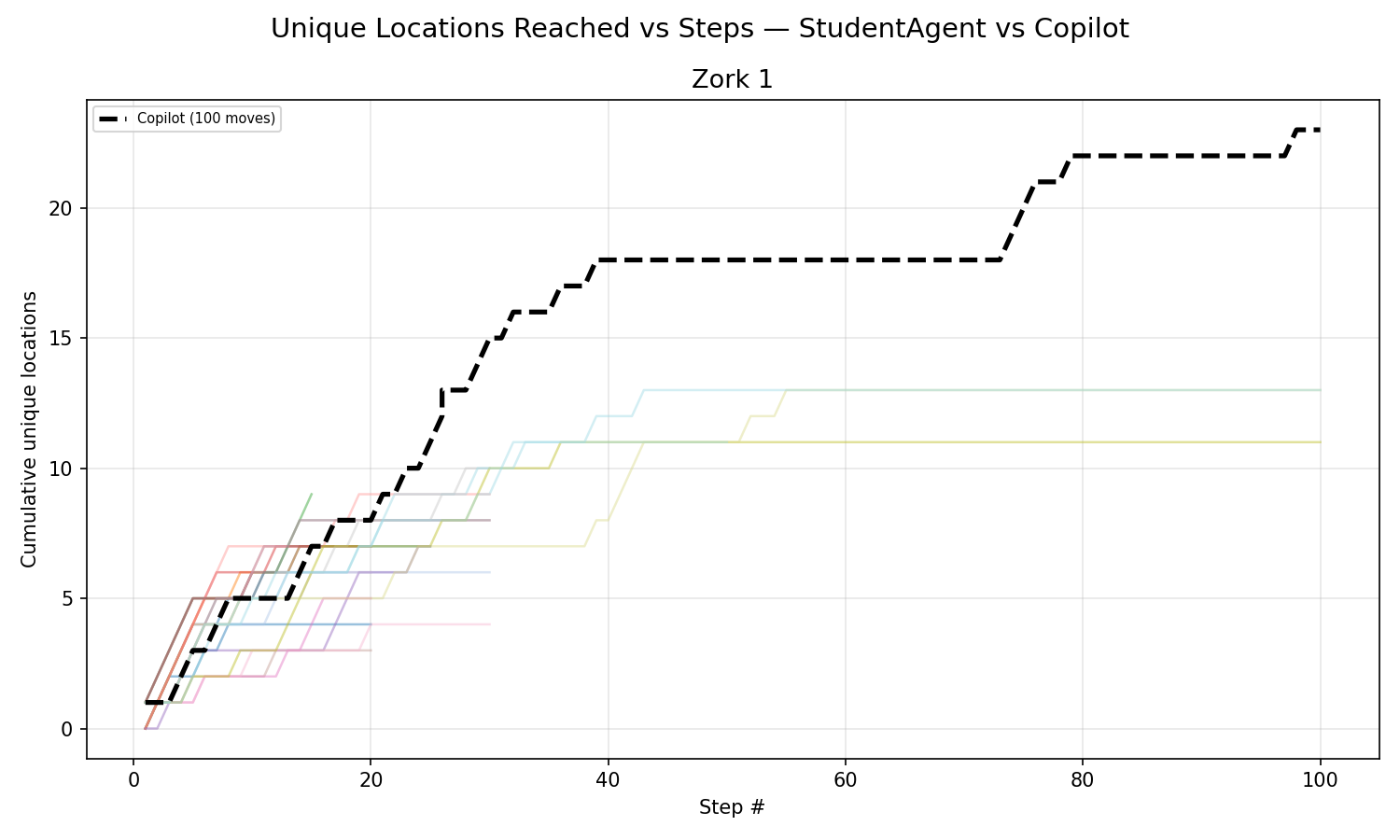
Most runs stop discovering new locations within the first 30–50 moves. After that, the agent enters a stagnation loop: it has exhausted the obvious interactions in a room but lacks the long term reasoning to figure out what it’s missing — a required item from three rooms back, a puzzle that needs a specific object, or simply an exit it hasn’t tried yet (even if checking if all exits have been tried is implemented!).
This is where the ReAct framework shows its limits. The pattern works well when each observation clearly suggests a next action. But text adventures often require holding multiple sub-goals in mind simultaneously: remembering that the dark passage needs a light source, that the egg came from a nest three rooms away, that the bottle of water might matter later. A simple thought/act loop with limited memory or planning skills is the bottleneck here.
The platform: Huggingface as the LLM provider ☁️
I used Huggingface Inference as the LLM backend (via huggingface_hub.InferenceClient).
I paid the $10 for the month I was going to work on this project.
What I liked:
- easy to get started (token + model name),
- easy to try multiple models with the same interface,
- good fit for experiments and iteration.
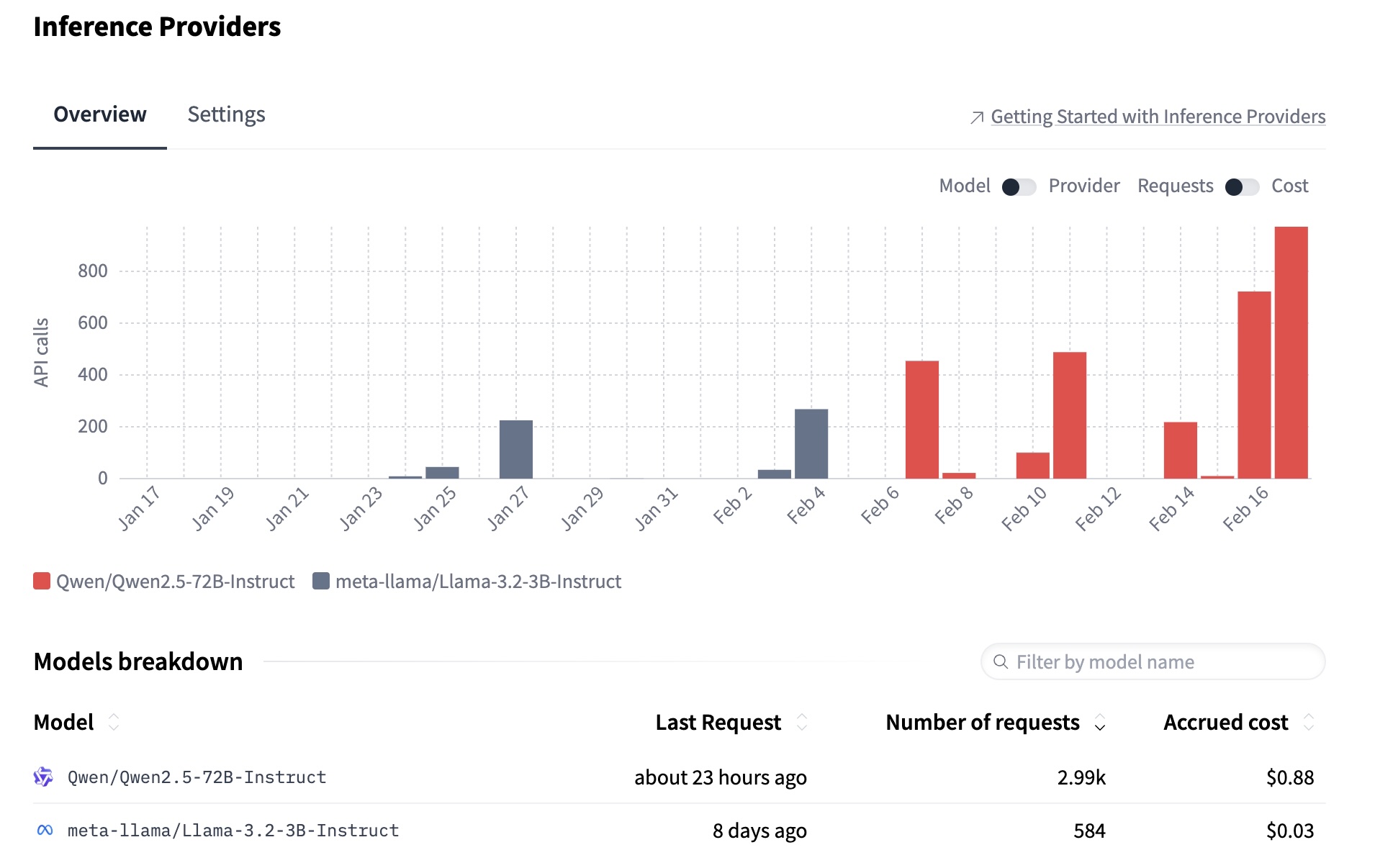
The chart below shows API usage across two models I tested. I started with llama-3.2-3B — cheap and fast, but too weak for this task. It struggled to parse room descriptions correctly, hallucinated actions, and collapsed into loops quickly. Switching to Qwen2.5-72B made a clear difference: better object recognition, more coherent reasoning chains, and far fewer stagnation loops. The tradeoff is cost and latency, but for an agent reasoning across 50 steps, model quality matters more than speed.
Extra things I built (that made this fun) ✨
A few “support tools” made development much smoother:
- Run logging: every step records thought/tool/args/result, plus score, moves, location, and inventory.
- Jericho interface exploration: small scripts to understand available methods and game internals.
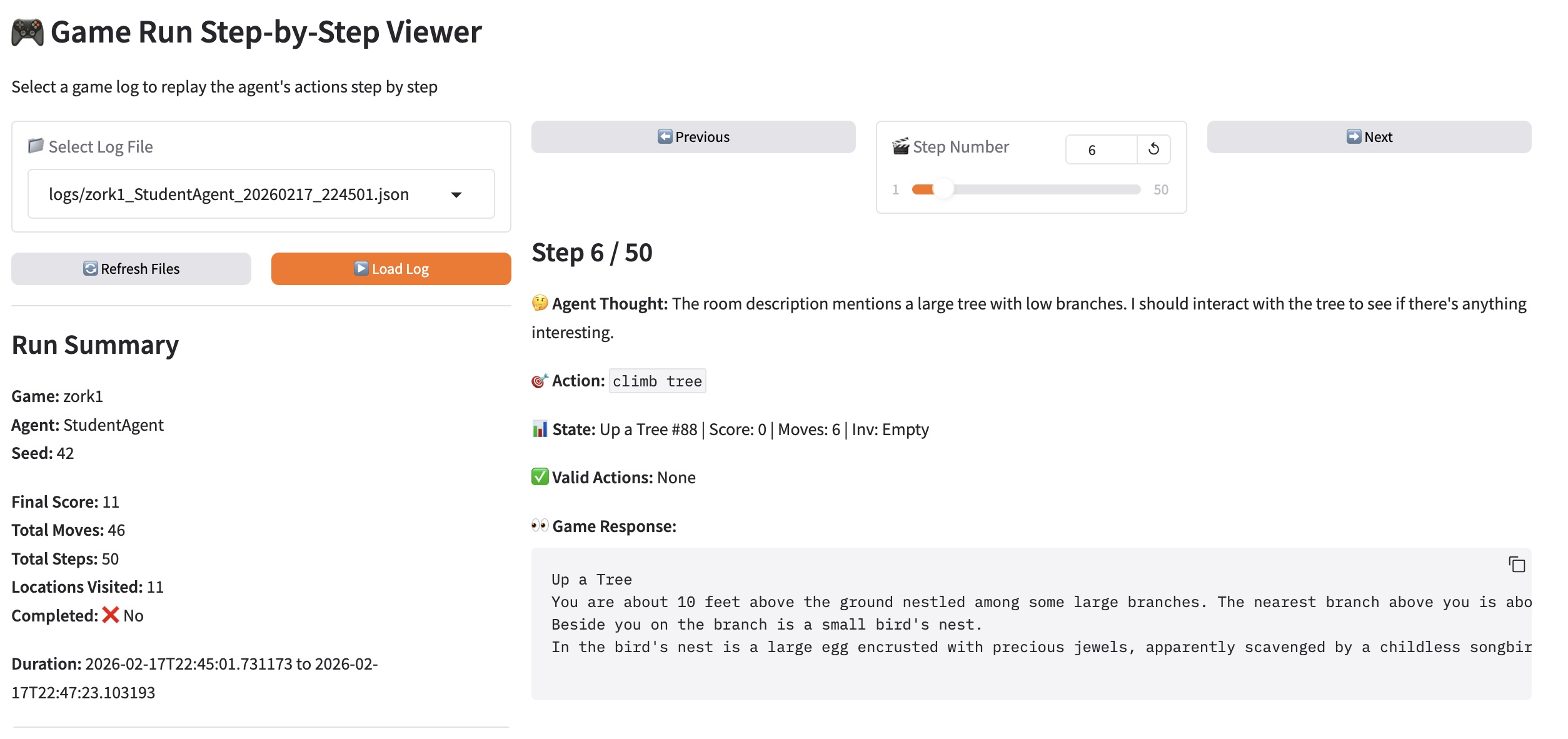
- Gradio run visualizer: a UI to load logs and replay the run step-by-step, plus charts and a location graph (
visualize_runs.py).
The gradio UI I built to debug runs:
-
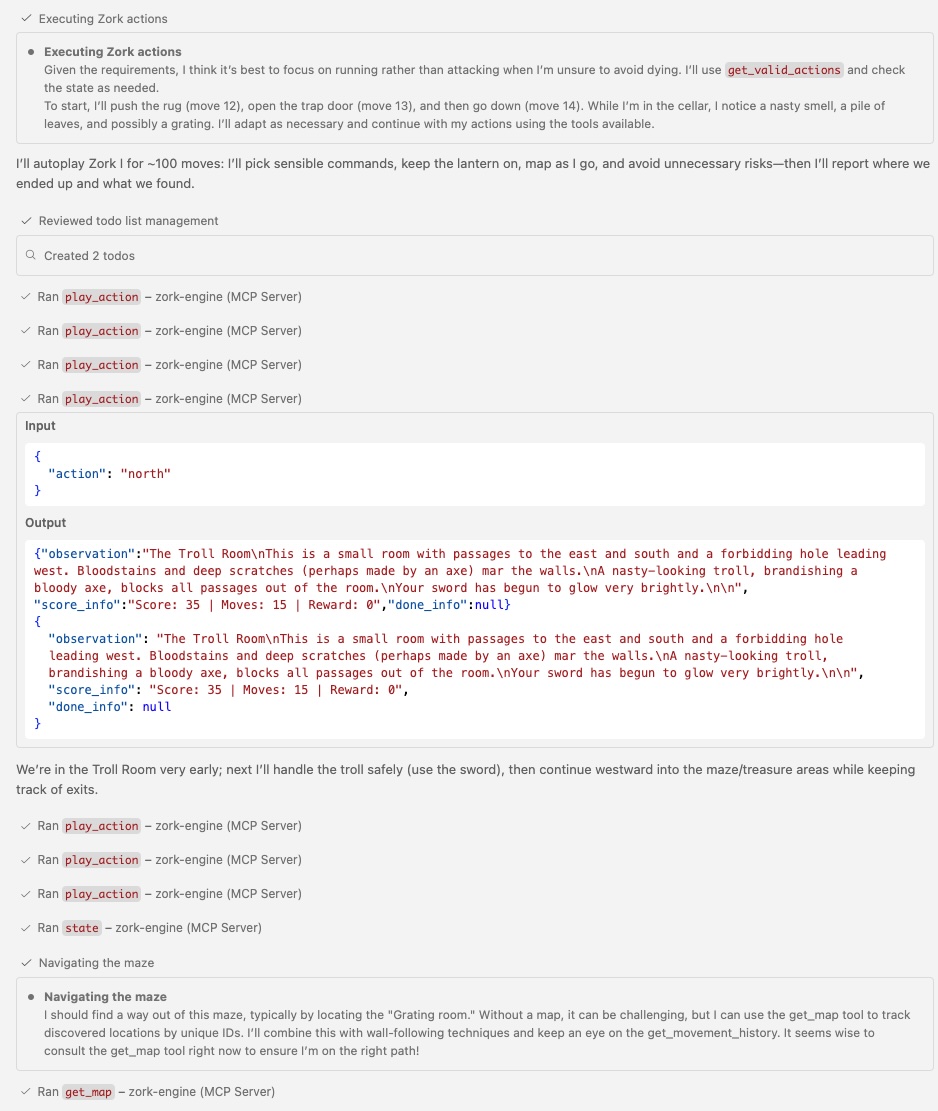
MCP server connected to VS Code (GPT-4.5 and Claude Sonnet 4.6): since the server speaks standard MCP, I could plug it directly into VS Code’s GitHub Copilot agent mode — no extra client code needed. The difference compared to my own ReAct implementation was striking.
These frontier models play at a different level entirely. They plan several steps ahead, hold sub-goals without losing track, and proactively go find a required item before attempting a puzzle. To be fair, they’ve likely been trained on Zork walkthroughs — so the comparison isn’t fully controlled — but it’s a useful illustration of what better reasoning looks like in practice.

More to explore 🚀
Next steps I’m excited about:
- Persist the map across runs (so exploration compounds instead of resetting every time).
- Persist “best ideas” (successful sub-plans, hypotheses, puzzle notes).
- Interrupt + resume mode (pause an agent, inspect state, continue without restarting).
- Multi-agent setups:
- one agent explores and maps,
- one agent focuses on puzzles/quests,
- one agent manages inventory and experimentation.
- Other projects that could use this architecture: any stateful environment with a small tool API.
References 🔗
- ZorkGPT — adaptive play, multi-agent ideas.
- Hinterding’s Zork + AI writeup
Two points I strongly agree with:
- Current limitations: AI can parse local context but struggles with long-term logic + spatial reasoning.
- “Vibe coding” risk: rapidly iterating with AI without refactoring can lead to a fragile, overly complex codebase.